Showing posts with label peripherals. Show all posts

Apple refreshes MacBook Pro, adds Thunderbolt aka Light Peak

Thunderbolt logo

Today Intel is scheduled to announce their new innovative Light Peak data transfer technology which is said to offer transfer rates 25 times faster than USB 2.0. It is also no incident that Apple chose to refresh their MacBook Pro lineup at the same time by adding the new Light Peak port re-branded as Thunderbolt.

Currently Light Peak transmits data at 10 gigabits per second. However, Intel says the new technology could be ramped up in the future to support up to 100 gigabits per second, which would be 250 times faster than USB 2.0. Light Peak also offers greater flexibility as it can employ both copper wires and fiber optics. It also makes it possible to combine Light Peak, USB and FireWire into one single cable of much greater length.


Thunderbolt features:
- Dual-channel 10 Gbps per port
- Bi-directional
- Dual-protocol (PCI Express and DisplayPort)
- Compatible with existing DisplayPort devices
- Daisy-chained devices
- Electrical or optical cables
- Low latency with highly accurate time synchronization
- Uses native protocol software drivers
- Power over cable for bus-powered devices

Intel is hoping to establish its new connectivity standard and it has partnered with Apple to drive the early adoption. This is not unlike 1998 when Apple helped push the USB standard by making it the only port on the first iMac.

In addition to the new Thunderbolt port Apple has made other important upgrades to its MacBook Pro line. Apple finally embraced the Intel Core i7 quad-core processor and blessed its 15 and 17 inch Pros with it, while the 13 inch now sports a dual-core i5 or i7. This should make all three versions twice as fast as the one they replace. It is about time Apple embraced quad-core processors in their notebooks as the competition has been offering quad-core laptops for quite some time now. The 15 and 17 inch MacBook Pro models also get the new refreshed high-performance AMD Radeon graphics processors, which boost graphics performance up to 3x times. To further compliment the new more powerful graphics Apple also added the new FaceTime HD camera, which makes full-screen HD video calls 3x times crispier.

MacBook Pro - new features at a glance

[Wikipedia]

Apple Magic Trackpad

Apple Magic Trackpad

If you like using gestures and want to truly get in touch with your Mac check out the Magic Trackpad from Apple. It's large, it's beautiful and it uses Bluetooth for seamless wireless communication. In theory it should work with any Bluetooth-enabled Mac (desktop or notebook) running OSX 10.6.4 or later. A new dedicated pane in System Preferences let's users enable and disable gestures to their liking. It's size, angle and design matches perfectly with Apple's aluminum Wireless Keyboard so if you already have one this trackpad will make a nice addition.
[Apple Magic Trackpad]


Dimensions:
Length: 5.17 inches (13.13 cm)
Width: 5.12 inches (13.01 cm)
Height: 0.18 - 0.72 inches (0.46 - 1.83 cm)
Weight (minus the batteries): 4.94 ounces / 140.05 g

Apple Aluminum Wired Keyboard with Numeric Keypad

Apple Aluminum Wired Keyboard with Numeric Keypad

This very slick and ultra-thin anodized aluminum keyboard from Apple features low-profile keys with crisp responsive feel. It comes with all the keys you would expect from a full sized keyboard and also features handy function keys at the top which make controlling your Mac a breeze. While designed specifically for the Mac this keyboard's main keys will function with Windows and Linux based operating systems, however it may take some time to get used to different key mappings (for example Windows and the Screenshot keys are not present, but there are ways to get around that). As a matter of fact we successfully used this keyboard for about two years with Windows XP, Mac OSX and Ubuntu. Two conveniently located USB 2.0 ports(one per side) allow the use of an external mouse, digital camera or a thumb drive. [Apple Keyboard with Numeric Keypad]

Apple Aluminum Wired Keyboard with Numeric Keypad - side view with USB port

- Function keys for screen brightness, volume, eject, play/pause, fast-forward and rewind, Exposé, and Dashboard
- Full size numeric pad
- Two USB 2.0 ports (one per side)
- USB extension cable is included

Motorola SB6120 SURFboard DOCSIS 3.0 eXtreme Broadband Cable Modem

Motorola SB6120 SURFboard DOCSIS 3.0 eXtreme Broadband Cable Modem

If you are looking for a new broadband cable modem - look no further! This slick Motorola modem packs a punch into a small form factor. It is using the latest Data Over Cable Service Interface Specification - DOCSIS 3.0 standard which supports channel bonding. Channel bonding enables multiple downstream and upstream channels to be utilized at the same time by the same subscriber. Thanks to channel bonding users get to enjoy blistering fast download and upload speeds - up to 160 Mbps down, and up to 120 Mbps up.

Features:
- 10/100/1000Base-T Gigabit Port offers incredible wired speeds
- DOCSIS 3.0 Certified
- Up to 160 Mbps downstream, and up to 120 Mbps upstream
- Intuitive and easy to understand front panel with status LEDs
- Works with Windows®, Macintosh®, and UNIX®
- Slim design saves precious space


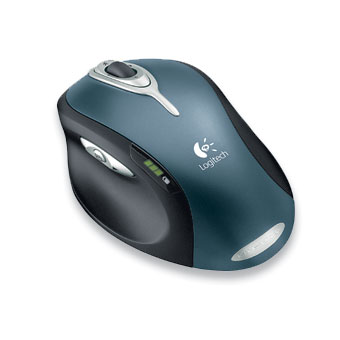
Logitech® MX™1000 Laser Cordless Mouse

Logitech is once again improving the breed by taking all the best features and combining them into one solid mouse!

The new MX Laser Engine provides 20x times the tracking power of inferior optical engines. The Fast RF interface provides unparalleled cordless performance, which is on par with USB corded connections. Unlike most cordless mice this one does not need batteries as the built-in lithium-ion battery and rapid charge docking station eliminate the headache of ever replacing the batteries. Note that MX-1000 will hold charge for about 2 weeks under heavy use and just to make sure you aren't caught by surprise there is a very cool battery level indicator located right on top of the mouse. This mouse sports some handy buttons as wells that should appeal to the masses. The thumb button offers a universal forward/back controls as well as application switch to quickly move between open windows. The scroll wheel, besides offering generic scroll wheel action, allows tilting for side-to-side scrolling. There is also a very handy cruise control button located immediately around the scroll wheel. A tap on the cruise control allows you to quickly scroll through long pages. The SetPoint software that comes with this mouse is intuitive and easy to use and allows user to assign alternative tasks to select buttons.

Overall this mouse gets the job done, is very comfortable in hand and looks great. Highly recommend!


  • Laser Technology
  • Rechargeable
  • Fast RF™ cordless
  • Superior grasp
  • Illuminated 4-level battery indicator
  • Powerful scrolling system
  • New thumb-button controls

Followers

Popular Posts